ORDER - SKINSTUDIO
0,00 
0
0,00 
0

ORDER

1. Add items to your cart

To place an order, select the desired product and click the “Add to Cart” button.

2. Go to your cart

You can view the contents of your cart by clicking on the cart icon in the top right corner.

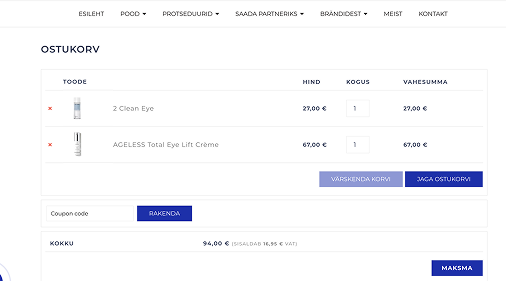
3. Open the cart

Once the products are selected, start the checkout process by clicking the “Cart” button in the top right corner.

In the cart, you can see all the added products — there you can change quantities or remove items.

If you have a discount code, enter it to receive a discount and click the “APPLY” button.

4. Place your order

When you’re ready, click the “Checkout” button to proceed to the order page.

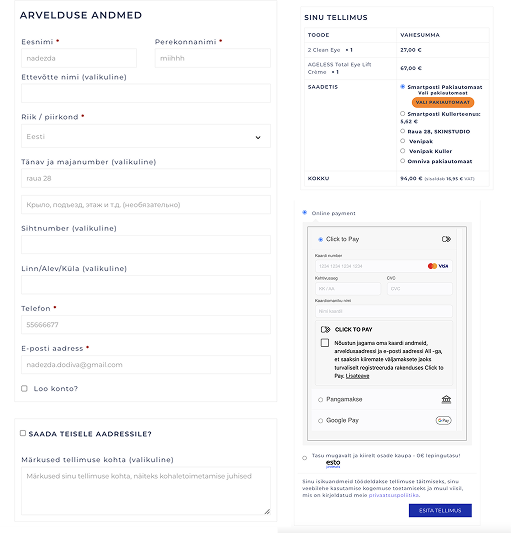
5. Payment details

On the checkout page, fill in your contact information, select a delivery method and payment option, then click “Go to pay” to continue.

6. Complete the payment

After clicking the “Pay” button, you’ll be redirected to a secure bank page. Once the payment is completed, make sure to click “Return to seller” to complete your order.

If the payment fails, you will automatically be redirected back to your cart. The purchase agreement is considered concluded once the order is placed and a confirmation email has been sent to you.

0
    0
    Your Cart
    Cart is emptyShop
    by category

    -5% on your first purchase

    Subscribe to our newsletter and get a -5% discount on your first purchase